Understanding the Statistics Page in NZBGet
The Statistics page in NZBGet provides detailed information about server performance, bandwidth usage, and article completion.
This information can help identify performance issues, server reliability problems, and configuration issues.
What Is Shown on the Statistics Page
When you open the Statistics page from the top menu, you are presented with dedicated panels for each configured news server. Each panel provides a detailed view of that server’s performance.
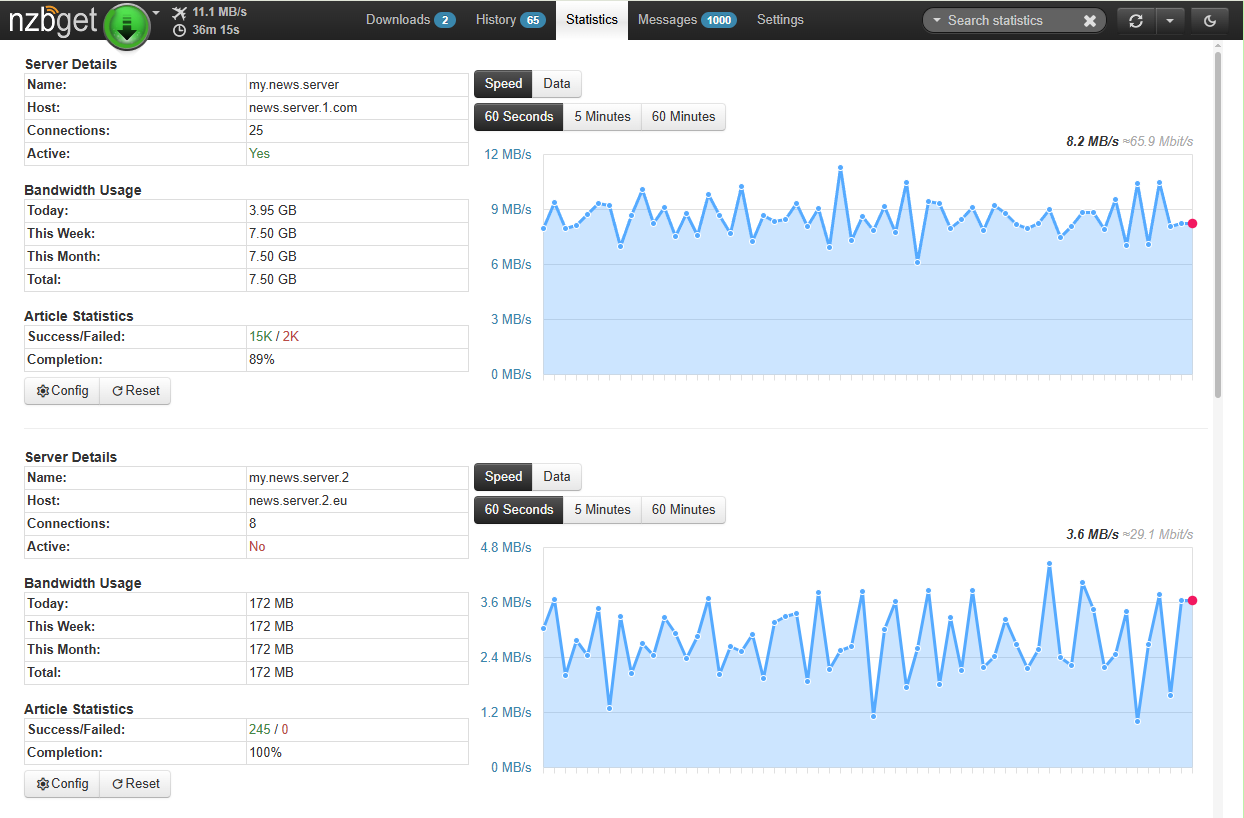
Server Details
This section shows basic information about the server, including its name, host address, number of configured connections, and whether the server is active.
Bandwidth Usage
This shows how much data has been downloaded from each server.
Why it matters:
This is especially useful for managing block accounts. Since block accounts charge per gigabyte, they should primarily be used for missing articles. If a secondary server is using a large amount of data, it may indicate that the primary server is missing articles or that server priorities are configured incorrectly.
Article Statistics
This shows the ratio of successful to failed articles, along with an overall completion percentage.
Why it matters:
The completion percentage reflects how well a server is able to provide required articles. Low completion rates may indicate poor retention or missing articles, increasing reliance on secondary servers.
Real-Time Graphs
An interactive graph shows server performance over time.
You can switch between views for download speed and total data usage. The speed view shows recent activity, while the data view allows longer-term analysis.
Quick Controls
The Reset button clears the server’s historical data, allowing you to start tracking fresh.
The Configure button opens the selected news server settings.
Practical Ways to Use This Data
Audit Your Subscriptions
Before renewing Usenet providers, review Article Statistics. If a secondary provider shows low completion rates, it may not be providing much value.
Fix Server Priorities
If a secondary server shows high bandwidth usage, review server priorities in Settings. The primary server should have the lowest priority number (Level 0), while fill servers should use higher values.
Troubleshoot Server Issues
If a server is marked as active but shows no bandwidth usage, check the server settings. There may be an authentication issue, an expired account, or a provider outage.
Introduction
Installation manuals
- Installation on Windows
- Installation on Windows via WinGet
- Installation on macOS
- Installation on macOS via Homebrew
- Installation on Linux
- Installation on Docker
- Installation on Docker - LinuxServer.io version
- Installation on Android
- Installation on Synology
- Installation on QNAP
- Installation on other NAS devices
Building manuals
Configuration
- Backup And Restore Settings
- Performance Tips
- Choosing Cipher
- Behind Other Web Server
- TLS certificate verification
- What is the Default NZBGet Password?
- NZBGet Docker Setup Guide
- NZBGet Port Settings and Access Guide
- How to Configure NZBGet: Complete Setup Guide
- What Is Usenet?
- NZBGet 502 Error: Quick Fix Guide
- How to Upgrade from NZBGet v21.1 to the Latest NZBGet Version
- Slow NZBGet Speeds? Here’s How to Fix It
- NZBGet Performance Optimization Guide
- NZBGet Path and Folder Structure Guide
- How to Link NZBGet with Sonarr, Radarr, and Other Tools
- Sonarr vs VideoSort: How They Work with NZBGet
- NZBGet Storage Guide: Improve Performance with Smarter Path Setup
- How to Configure NZBGet on Android TV
- Using NZBGet with Sonarr and Radarr on Android TV
Performance tuning
- How to Optimize Usenet Performance in NZBGet
- NZBGet SystemHealth: Configuration and Environment Diagnostics
- Testing Usenet Speed and Performance in NZBGet
- Diagnosing and Maximizing Usenet Speeds in NZBGet
- Understanding Download Health in NZBGet
- Finding the Optimal Connection Count in NZBGet
- Primary vs Fill Servers Explained
- Understanding the Statistics Page in NZBGet
Usage
- Quick Filter
- Keyboard Shortcuts
- RSS and duplicate check
- VideoSort
- Console Mode
- Command Line Reference
- Performing Speed Tests
- NZBGet Interface Buttons Explained: What They Do and How to Use Them
- How to Use the NZBGet Status Tab
Development
Extensions
- Extension Scripts
- Post-processing scripts
- Scan Scripts
- Queue Scripts
- Scheduler Scripts
- Feed Scripts
- NZBGet Extension Manager: What It Is and How to Use It
- API reference
News server setup
- Astraweb
- BlockNews
- Cheapnews
- EasyNews
- Eweka
- FreeDiscussions
- Frugal Usenet
- GigaNews
- NewsDemon
- Newsgroup Ninja
- NewsgroupDirect
- Newshosting
- Pure Usenet
- SunnyUsenet
- Supernews
- theCubeNet
- ThunderNews
- TweakNews
- Usenet.Farm
- UsenetExpress
- UsenetServer
- UseNext
- ViperNews
- XLned
- XS News