NZBGet SystemHealth: Configuration and Environment Diagnostics
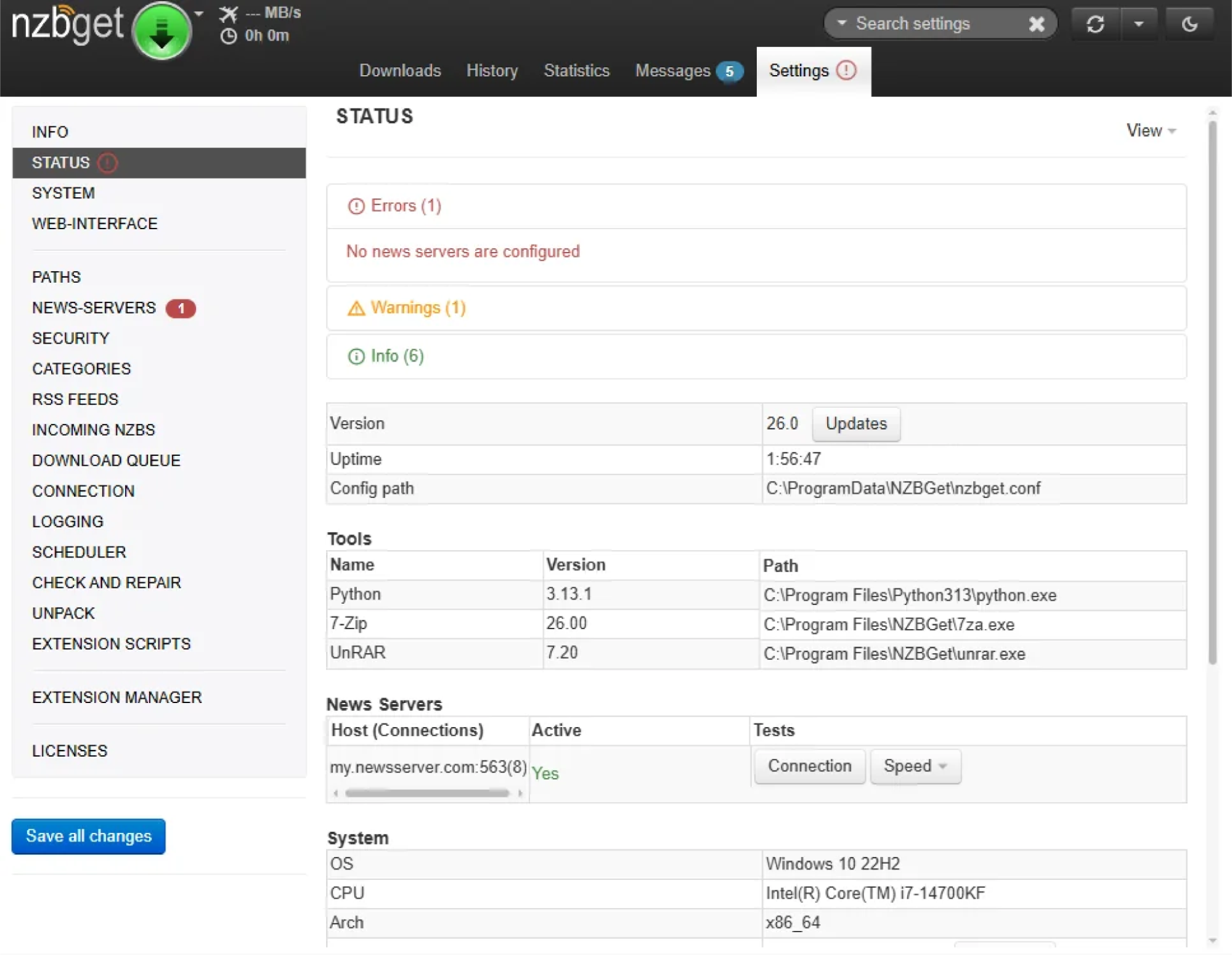
SystemHealth is a built-in diagnostic tool found on the NZBGet Status page. It helps to configure the software correctly for the first time, and advanced users to fine-tune their existing setups.
When NZBGet starts, SystemHealth automatically runs checks to validate your settings. These checks help detect common configuration problems and ensure your system is working correctly.
SystemHealth can help you:
- Detect conflicting settings or missing software dependencies
- Identify configuration values that may reduce performance
- Identify filesystem or hardware-compatibility issues
Severity Levels
SystemHealth reports are grouped into three categories to help you prioritize any necessary fixes:
- 🔴 Error: Critical issues that prevent NZBGet from working properly. Example: No news servers are configured or an empty DestDir). Errors are marked with a red exclamation mark on the Settings and Status tabs, along with a numbered red badge.
- 🟡 Warning: Non-critical issues that might impact performance or cause minor stability problems. Fixing warnings is recommended for most setups, though some advanced configurations may intentionally ignore them.
- 🟢 Info: General system details. This section displays your current settings, automated processes, and recommendations for security and optimization.
How to Enable or Disable SystemHealth
SystemHealth checks run automatically by default. You can enable or disable them in settings:
Go to: Settings → Logging → SystemHealthCheck
Check your Status page to see your current SystemHealth report and ensure your NZBGet environment is configured correctly.
Introduction
Installation manuals
- Installation on Windows
- Installation on Windows via WinGet
- Installation on macOS
- Installation on macOS via Homebrew
- Installation on Linux
- Installation on Docker
- Installation on Docker - LinuxServer.io version
- Installation on Android
- Installation on Synology
- Installation on QNAP
- Installation on other NAS devices
Building manuals
Configuration
- Backup And Restore Settings
- Performance Tips
- Choosing Cipher
- Behind Other Web Server
- TLS certificate verification
- What is the Default NZBGet Password?
- NZBGet Docker Setup Guide
- NZBGet Port Settings and Access Guide
- How to Configure NZBGet: Complete Setup Guide
- What Is Usenet?
- NZBGet 502 Error: Quick Fix Guide
- How to Upgrade from NZBGet v21.1 to the Latest NZBGet Version
- Slow NZBGet Speeds? Here’s How to Fix It
- NZBGet Performance Optimization Guide
- NZBGet Path and Folder Structure Guide
- How to Link NZBGet with Sonarr, Radarr, and Other Tools
- Sonarr vs VideoSort: How They Work with NZBGet
- NZBGet Storage Guide: Improve Performance with Smarter Path Setup
- How to Configure NZBGet on Android TV
- Using NZBGet with Sonarr and Radarr on Android TV
Performance tuning
- How to Optimize Usenet Performance in NZBGet
- NZBGet SystemHealth: Configuration and Environment Diagnostics
- Testing Usenet Speed and Performance in NZBGet
- Diagnosing and Maximizing Usenet Speeds in NZBGet
- Understanding Download Health in NZBGet
- Finding the Optimal Connection Count in NZBGet
- Primary vs Fill Servers Explained
- Understanding the Statistics Page in NZBGet
Usage
- Quick Filter
- Keyboard Shortcuts
- RSS and duplicate check
- VideoSort
- Console Mode
- Command Line Reference
- Performing Speed Tests
- NZBGet Interface Buttons Explained: What They Do and How to Use Them
- How to Use the NZBGet Status Tab
Development
Extensions
- Extension Scripts
- Post-processing scripts
- Scan Scripts
- Queue Scripts
- Scheduler Scripts
- Feed Scripts
- NZBGet Extension Manager: What It Is and How to Use It
- API reference
News server setup
- Astraweb
- BlockNews
- Cheapnews
- EasyNews
- Eweka
- FreeDiscussions
- Frugal Usenet
- GigaNews
- NewsDemon
- Newsgroup Ninja
- NewsgroupDirect
- Newshosting
- Pure Usenet
- SunnyUsenet
- Supernews
- theCubeNet
- ThunderNews
- TweakNews
- Usenet.Farm
- UsenetExpress
- UsenetServer
- UseNext
- ViperNews
- XLned
- XS News